
More in Getting started and access
PROPELOS PARTNER PORTAL GUIDE
Reset your Partner Portal password
Request a reset link and choose a new password for the Propelos accounts you access with that email.
Activated Partner Portal users
In this guide
Choose a new password using your sign-in email. The new password applies to every Propelos account you access with that email.
1. Request a reset
On the sign-in page, select Forgot your password?.
 Select the image to view it full size.
2. Send the link to your email
Enter your sign-in email. Complete a verification challenge if one appears, then select Send reset link. Check your inbox and spam folder.
 Select the image to view it full size.
 Select the image to view it full size.
3. Choose and save a new password
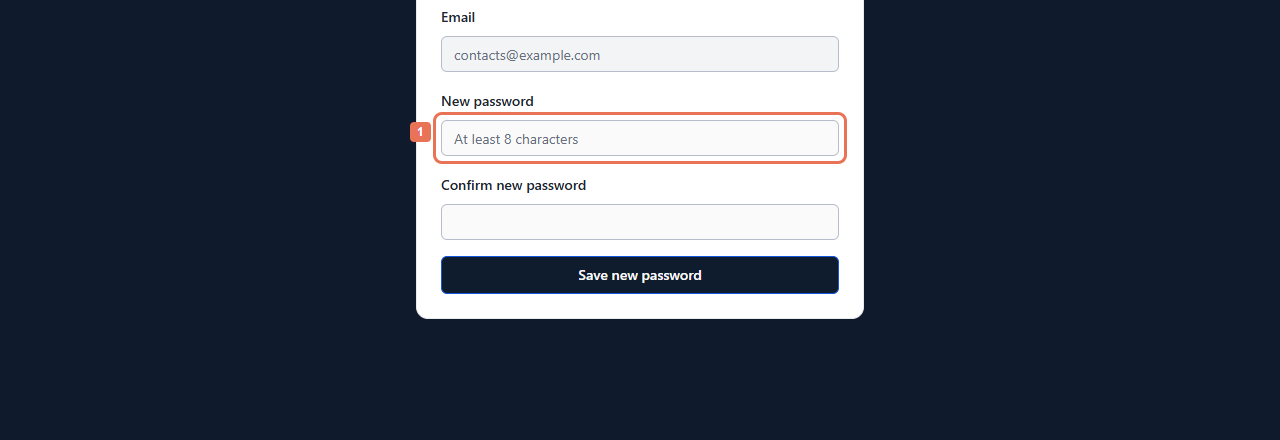
Open the complete email link within 60 minutes. Enter New password and Confirm new password, using at least eight characters. Select Save new password.
 Select the image to view it full size.
 Select the image to view it full size.
You are signed in if an active account is available. Each reset link works once. For an expired, used or incomplete link, select Ask for a new link.
The request confirmation does not establish whether an email has an active account. New users must accept their invitation first. If the account is inactive, contact the person who arranged your access.