
More in Languages and translation
PROPELOS CMS GUIDE
Translate after publishing English content
Use the translation prompt beside Publish changes and review each updated language.
English content with a Translate button beside publishing controls
In this guide
After publishing English content, you can regenerate its other website languages using the translation prompt. Publishing English alone does not update those translations.
When nothing has changed since you published, the translations go live straight away. If the item has been edited again since publishing, even by an automatic save, the translations are added to those unpublished changes instead and go live the next time you click Publish changes.
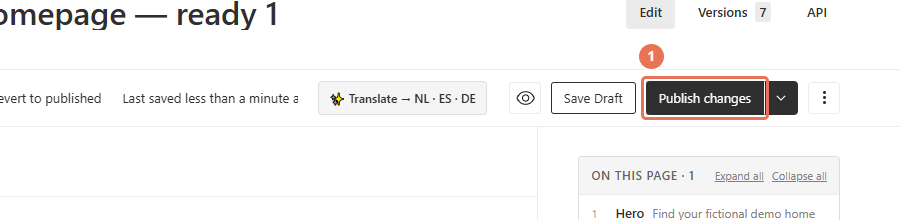
1. Publish the English update
With English selected in the top-right Locale menu, click Publish changes when the English content is ready for visitors.
 Select the image to view it full size.
2. Choose whether to translate
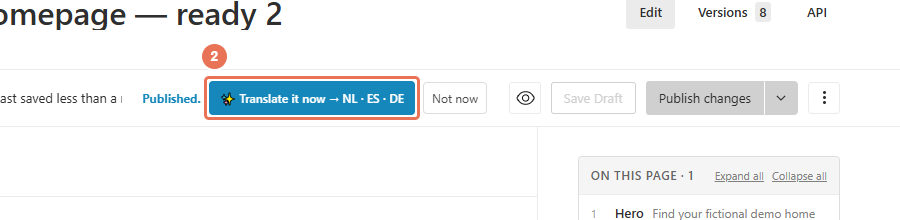
Once publishing has finished, click Translate it now to update the languages listed beside it. This overwrites their translated text; choose Not now if you want to keep the existing translations.
 Select the image to view it full size.
3. Check the translation result
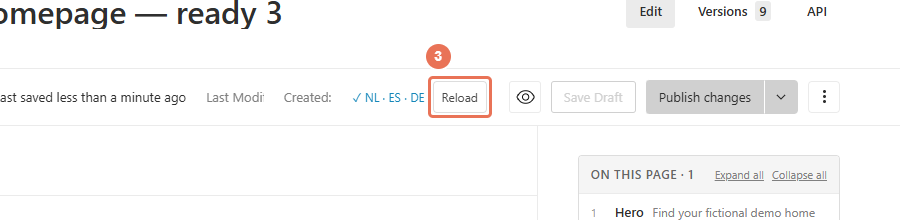
Wait for the result. A tick marks languages that are now live, in draft marks languages saved with unpublished changes that go live when you next click Publish changes, and a cross marks failures. Click Reload to load the updated content.
 Select the image to view it full size.
4. Review each language
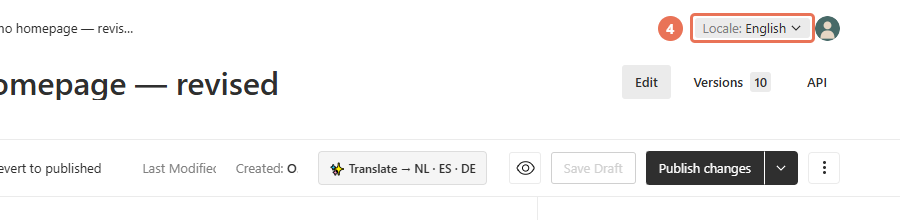
Open the Locale menu in the top right and choose each updated language. Review the text, links, SEO details and image descriptions, then check the public page in that language.
 Select the image to view it full size.
You may also see Translate → followed by language codes before publishing. It uses the latest saved English text and overwrites the listed languages. If the item has unpublished changes, the translations are saved with them and go live when you publish; otherwise they go live straight away. The prompt translates content into languages your website already serves; contact Propelos to add a new visitor language.